

The MOBILE Honest Money Wallet
A very simple multi-chain wallet. Send and receive crypto—all in one app.
How to Set Up Your Honest Money Wallet
Setting up your wallet is simple. Follow the steps below to import your existing wallet using the seed phrase you received when you created it.
Step 1 — Go to the Honest Money Wallet
First, go to:
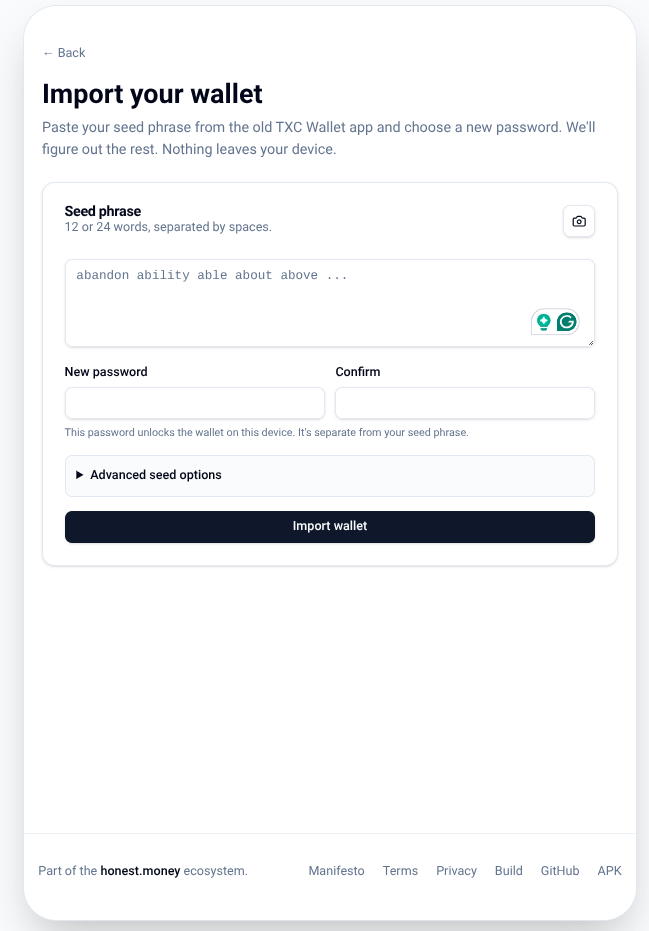
Once you are there, you will see a box with four different sections.
Step 2 — Enter Your Seed Phrase
The first and largest box will say “Seed Phrase.”
Enter the seed phrase that you were given when you created your wallet.
Make sure you type the seed phrase exactly as it was given to you.
Step 3 — Create a New Password
Below the Seed Phrase section, you will see two boxes:
- New Password
- Confirm
Enter a personal password that you will use to log back into your wallet.
You will need to enter this password every time you need to log back into the wallet.
Step 4 — Import Your Wallet
Once you have entered your seed phrase and created your password, click “Import Wallet.”
That’s it! Your wallet is now set up and ready to use.