

Goldshell Mini DOGE III Miner Setup Guide
How to Setup Your Mini DOGE III Home Miner
Your home miner connects to the Honest.Money merged-mining pool — pool.honest.money — mining Texitcoin (TXC), Iskander (ISK), Zero Chill Units (ZCU), Litecoin (LTC), and Dogecoin (DOGE); Only LTC and DOGE are paid out to you. These payouts help offset the electricity cost of running the miner.
You'll need your own LTC and DOGE receive addresses. Use a hot or hardware wallet you control, not an exchange address — many exchanges don't accept the small "dust" deposits mining payouts arrive in. The same wallet can hold both addresses. Wallets confirmed to support LTC and DOGE:
- ● Hot wallet: We recommend the mobile.honest.money wallet!
- ● Hardware wallet: Tangem, Ledger, or Trezor.
STEP 1 — REGISTER YOUR WALLETS WITH THE POOL
Before connecting your miner, register your LTC and DOGE addresses with the pool so your payouts are credited correctly. This is a one-time, per-pool registration. If you've already registered these addresses with the previous pool (pool.texitcoin.org), you can skip this step, the same LTC address and dogelink token will work on the new pool.
- Go to: pool.honest.money
- Enter your LTC mining wallet address and your DOGE payout address, then answer the simple security question and submit. Both must be mainnet addresses:
- LTC begins with ltc1, L, M, or 3
- DOGE begins with D, A, or 9
- The pool validates each address against its coin wallet before registering it.
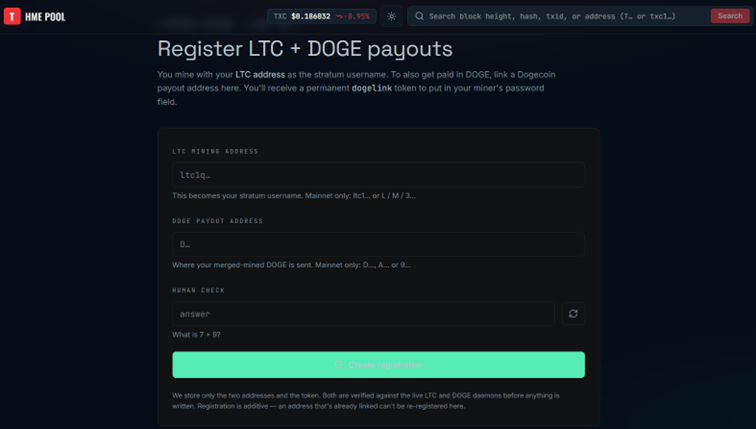
Note: If signing up for the first time, use brand-new LTC/DOGE addresses only — each LTC address links to exactly one DOGE address (and vice versa), so double-check both before submitting.
The confirmation screen shows your Permanent DOGE Token and "Miner Password" (same value). Copy it down; you'll use it as the password in STEP 3.
STEP 2 — SET UP THE MINER HARDWARE
-
Unbox and confirm you have: the miner, a PSU with a 6-pin cable, an Ethernet cable, and an AC power cord.
-
Connect the PSU to the miner and the Ethernet cable between the miner and your router, then plug in the AC power cord — it powers on automatically.
-
Wait a few minutes for it to boot up and initialize.
-
On a computer connected to the same local network as the miner, go to find.goldshell.com. It lists any Goldshell miners it detects, with their IP address (as columns: Miner / IP / UpdateTime / Setting).
-
Click the miner's row (or its Setting link) to open its dashboard — or enter its IP address directly into your browser.
-
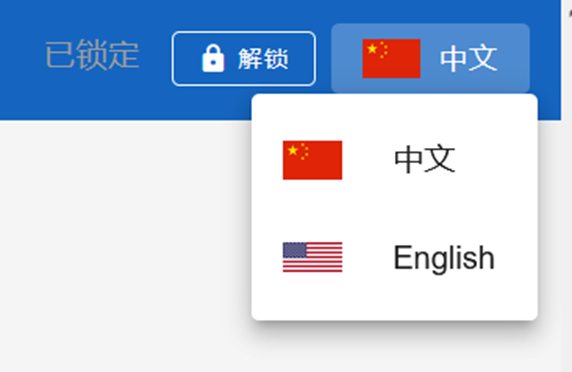
In the top right corner, click the Chinese Flag and then the American flag from the dropdown.
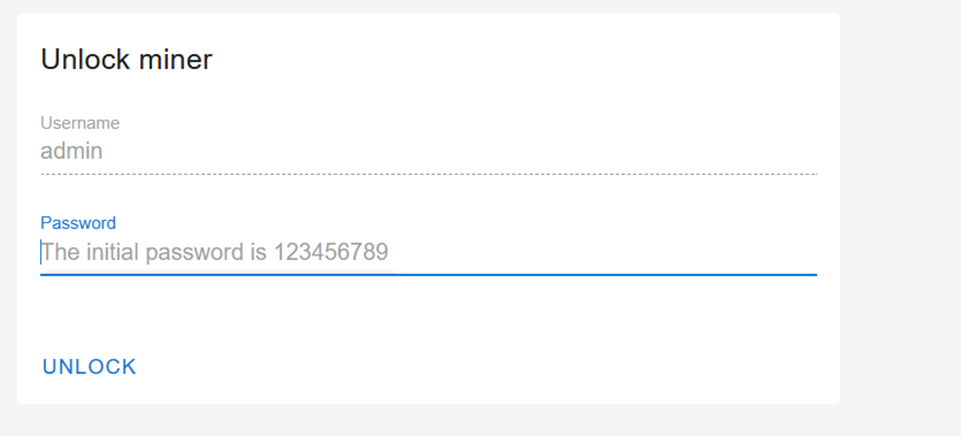
- Click Unlock and log in with Username: admin, Password: 123456789 (default).
STEP 3 — CONNECT TO THE POOL
In the miner's dashboard, go to Miner → Pool settings and click ADD to open the Pool Config box. It has four fields — Protocol, URL, Miner Name, and Password:
- ● Protocol: stratum+tcp
- ● URL: stratum.pool.honest.money:3433
- ● Miner Name: your LTC wallet address by itself — no "@" symbol, nothing appended.
- ● Password: dogelink=<your Permanent DOGE Token from Step 1>
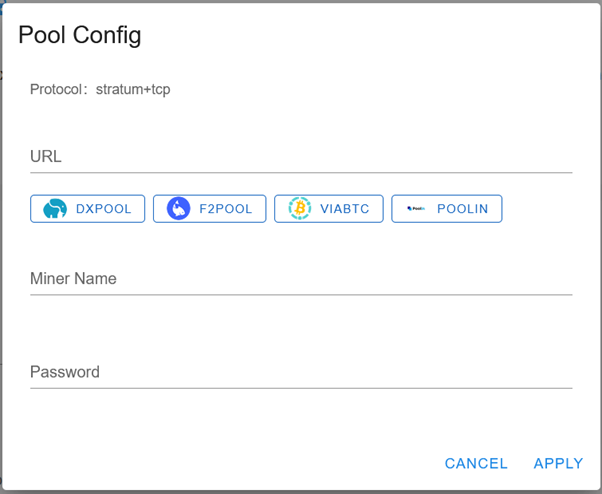
- Example format:
- Protocol: stratum+tcp
- URL: stratum.pool.honest.money:3433
- Miner Name: ltc1qexampleaddress0000000000000000000000
- Password: dogelink=A1B2C3D4E5F60708A9B0C1D2
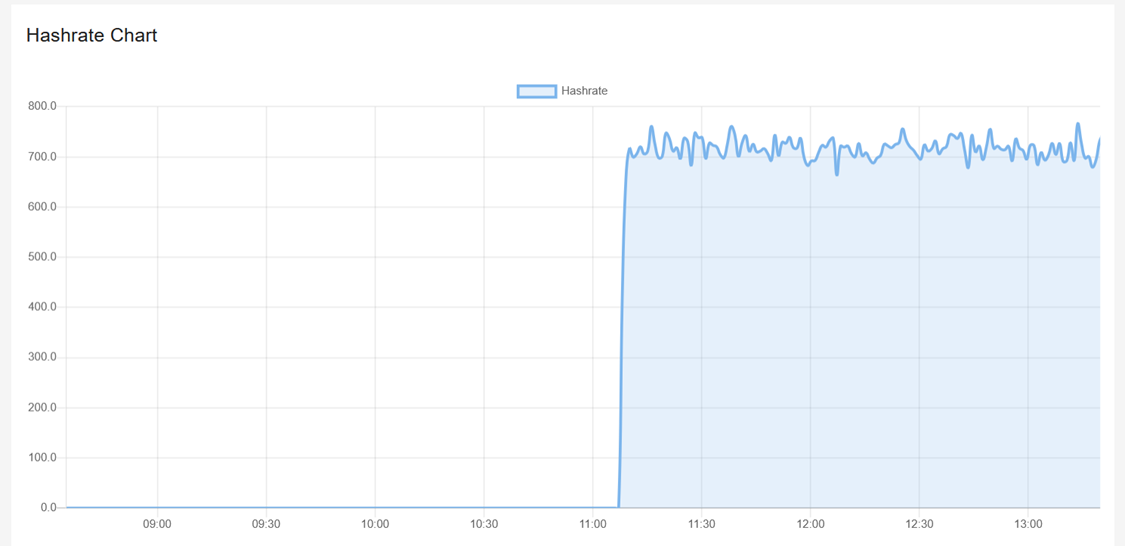
Click Apply to store the pool entry. You need to reboot the miner. Click System, then scroll to the bottom and click RESTART. The status page below should populate once connected. Confirm it's mining: the dashboard's Home/Status page should show a Hashrate near 700 MH/s and an active Hashrate chart.
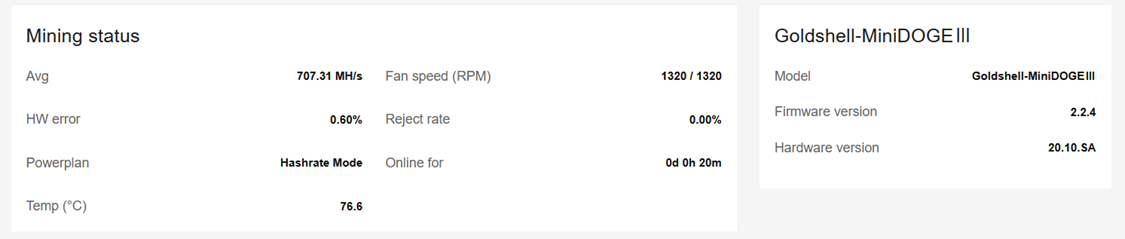
After a few hours, your Hashrate chart should look like this.
TROUBLESHOOTING NOTE: If mining stops or Hashrate drops sharply, check temperature and airflow first — Scrypt ASIC miners in this class throttle or stop under excess heat as a built-in safety measure.