

ElphaPex DG1 Home Miner Setup Guide
How to Setup Your DG1 Home Miner
Your home miner connects to the Honest.Money merged-mining pool — pool.honest.money — mining Texitcoin (TXC), Iskander (ISK), Zero Chill Units (ZCU), Litecoin (LTC), and Dogecoin (DOGE); merge-mined over the same connection. Only LTC and DOGE are paid out to you. These payouts help offset the electricity cost of running the miner.
You'll need your own LTC and DOGE receive addresses. Use a hot or hardware wallet you control, not an exchange address — many exchanges don't accept the small "dust" deposits mining payouts arrive in. The same wallet can hold both addresses. Wallets confirmed to support LTC and DOGE:
- Hot wallet: We recommend the https://mobile.honest.money/ wallet!
- Hardware wallet: Tangem, Ledger, or Trezor.
STEP 1 — REGISTER YOUR WALLETS WITH THE POOL
Before connecting your miner, register your LTC and DOGE addresses with the pool so your payouts are credited correctly. This is a one-time, per-pool registration. If you've already registered these addresses with the previous pool (pool.texitcoin.org), you can skip this step, the same LTC address and dogelink token will work on the new pool.
- Go to: pool.honest.money
- Enter your LTC mining wallet address and your DOGE payout address, then answer the simple security question and submit. Both must be mainnet addresses:
- LTC begins with ltc1, L, M, or 3
- DOGE begins with D, A, or 9
- The pool validates each address against its coin wallet before registering it.
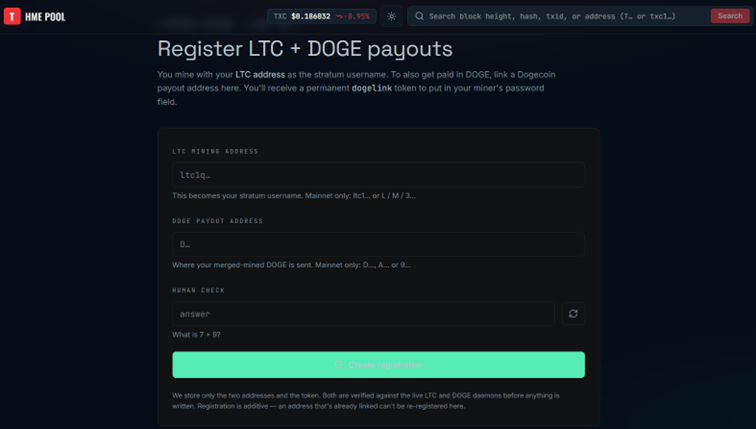
Note: If signing up for the first time, use brand-new LTC/DOGE addresses only — each LTC address links to exactly one DOGE address (and vice versa), so double-check both before submitting.
The confirmation screen shows your Permanent DOGE Token and "Miner Password" (same value). Copy it down; you'll use it as the password in STEP 3.
STEP 2 — SET UP THE MINER HARDWARE
Physically set up the machine and find it on your network:
- Download ElphaPexTool (Windows only) and the DG Home 1 Server Manual from https://elphapex.com/support/download?type=Manual. Follow the manual to power on and physically connect the miner to your home network (Ethernet recommended for initial setup).
- Extract and open ElphaPexTool.exe. Make sure your computer is on the same network as the miner, add your network segment range, then click Scan.
- Double-click the miner's line in the results list — this opens its web dashboard in your browser.
 ElphaPexTool after a completed scan — double-click a server's row to open its dashboard
- Log in with username root and password root (default credentials).
- Optional: set a static IP (IP section) or connect the miner to WiFi (WIFI section) so you can unplug the Ethernet cable later.
STEP 3 — CONNECT TO THE POOL
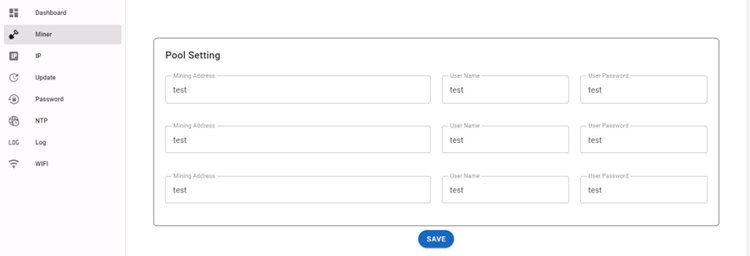
In the miner's web dashboard, open the Miner tab (Pool Setting). The miner supports up to three pool entries, but you only need to fill in one (Pool 1):
- ● Mining Address: stratum+tcp://stratum.pool.honest.money:3433
- ● User Name: your LTC wallet address, entered by itself — no “@” symbol and nothing appended to it.
- ● User Password: dogelink=<your Permanent DOGE Token from Step 1>
-
Example format: -
Mining Address: stratum+tcp://stratum.pool.honest.money:3433 -
User Name: ltc1qexampleaddress0000000000000000000000 -
User Password: dogelink=A1B2C3D4E5F60708A9B0C1D2
Click SAVE at the bottom of the Pool Setting screen.
Reboot the machine (button at the bottom of the dashboard) and wait about 60 seconds.
If the dashboard doesn't reload automatically, use ElphaPexTool again to rescan and find the miner's IP address, then reconnect in your browser.
It takes 5–10 minutes for the miner to start working. You'll know it's mining when the status circles at the top of the Dashboard (Rate, Network, Fans, Temp) turn from red to green.
 The Dashboard — Rate/Network/Fans/Temp circles turn green once the miner is working normally.
TROUBLESHOOTING NOTE If the outlet temperature on a hash board reaches 85°C, the miner's built-in protection automatically stops mining until it cools. This is normal safety behavior, not a fault — check airflow around the unit if it happens often.