

Zero Chill Shards
Overview
Shards are the shared currency of the Zero Chill ecosystem.
Your Shard balance is connected to your Zero Chill account and is designed to work across participating Zero Chill games, features, streams, rewards, and future experiences.
Players can earn Shards through eligible gameplay and rewards or purchase Shard Packs directly through ZeroChill.com.
Shard Value
Zero Chill uses the following conversion:
100 Shards = $1.00
This conversion applies to purchases, upgrades, unlocks, and other Shard-powered features throughout Zero Chill.
How to Access Your Shards
- Go to ZeroChill.com.
- Sign in to your Zero Chill account.
- Open the ☰ Menu.
- Select SHARDS.
The Shards page is the central location for:
• Shard balances
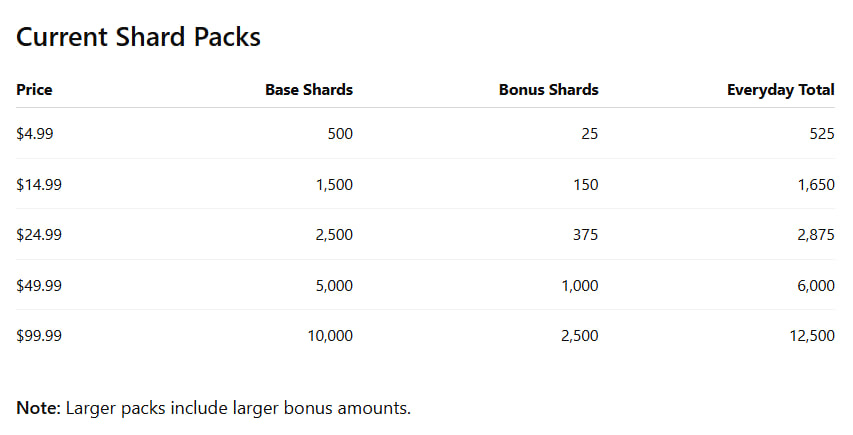
• Shard Packs
• Card and crypto purchase options
• Earned Shards
• Purchase activity
• Bonuses
• Shard History
Your current Available Shard balance may also appear in the navigation bar at the top of Zero Chill while you are signed in.
Understanding Shard Balances
The Shards page separates your balance into three categories:
Pending Shards
Pending Shards are rewards you have earned that have not yet become spendable.
Earned Shards may remain Pending for approximately 24 hours while Zero Chill's fair-play checks are completed.
Once an eligible reward matures, the Shards move into your Available balance.
Example: If you earn 15 Shards from an eligible game, your History may initially show:
EARN (PENDING) +15 The entry may also indicate that the reward matures in approximately 24 hours.
Available Shards
• Available Shards are ready to use.
• This is your spendable Shard balance.
• When Pending Shards successfully mature, they are moved into your Available balance.
• Purchased Shards are also credited to your account after the applicable payment requirements have been completed.
Reserved Shards
• Reserved Shards are temporarily locked while an eligible transaction or claim is being processed.
• This prevents the same Shards from being used twice during an in-flight claim.
• Once the applicable process is completed, the reserved amount will be updated accordingly.
How to Earn Shards
Players may earn Shards through eligible Zero Chill activities, including:
• Playing participating games
• Winning prizes
• Completing eligible challenges
• Receiving rewards
• Participating in promotions
• Participating in special Zero Chill events
Reward amounts and eligibility may vary by game, event, or promotion.
Note: Gameplay-earned Shards may first enter your Pending balance while fair-play checks are completed.
How to Purchase Shards
• Shard Packs can be purchased directly from the SHARDS page.
Steps
- Sign in to ZeroChill.com.
- Open the ☰ Menu.
- Select SHARDS.
- Scroll to the available Shard Packs.
- Select the desired pack.
- Choose CARD or CRYPTO.
- Complete the payment process.
Once successfully credited, the Shards will appear in your Zero Chill account.
First Purchase Double
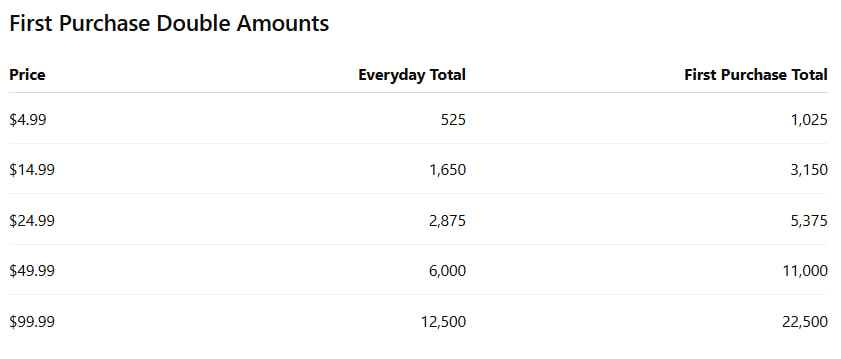
Eligible players can receive a special First Purchase Double bonus on their first qualifying Shard Pack purchase.
The promotion doubles the base Shards contained in the selected pack.
The pack's normal bonus Shards are then added once.
The bonus portion of the pack is not doubled.
Example
A normal $24.99 Shard Pack contains:
• 2,500 base Shards
• 375 bonus Shards
• 2,875 total Shards
If this is the player's qualifying first purchase:
• The 2,500 base Shards are doubled to 5,000
• The regular 375 bonus Shards are added once
• The total received is 5,375 Shards
First Purchase Double Rules
• The promotion applies only to the first qualifying Shard Pack purchase.
• It can be used once per Zero Chill account.
• Any available qualifying Shard Pack size may be selected.
• The pack's base Shards are doubled.
• The pack's normal bonus Shards are added once and are not doubled.
• Future purchases receive the normal everyday amount.
• Additional Shard Packs may be purchased after the First Purchase Double has been used.
Important: Because the promotion applies only once, players should consider which pack they want before completing their first Shard purchase.
Payment Methods
Card
Yes. Shard Packs can be purchased using a card.
- Go to the SHARDS page.
- Select the desired Shard Pack.
- Select CARD.
- Complete the payment process.
After a successful card payment, the applicable Shards are credited to the Zero Chill account.
Crypto
Yes. Supported Shard Packs can also be purchased using crypto.
- Select the desired Shard Pack.
- Select CRYPTO.
- Complete the payment process.
Crypto transactions must receive the required blockchain confirmation before the applicable Shards are credited.
Confirmation will normally take only a few minutes, although blockchain confirmation times may vary.
Shard History and Activity
Shard activity can be viewed directly on the SHARDS page.
Scroll down to the HISTORY section.
History displays the newest activity first.
Depending on the account activity, entries may include:
• EARN (PENDING)
• MATURED
• Shard Pack purchases
• First Purchase Double bonuses
• Adjustments
• Other Shard-related activity
Each History entry may include:
• Date
• Time
• Activity type
• Game or transaction description
• Number of Shards added, moved, or adjusted
The History system is append-only, meaning corrections are recorded as new entries rather than silently replacing previous activity.
This provides players with a visible record of activity affecting their Shard balance.
Understanding Shard History Entries
EARN (PENDING)
• EARN (PENDING) means the player earned Shards through an eligible activity, but the Shards are still completing the approximately 24-hour maturation and fair-play review period.
• These Shards are not yet part of the Available balance.
• Once eligible Shards mature, the corresponding amount becomes available for use.
MATURED
• A MATURED entry indicates that previously Pending Shards have completed their maturation period.
• Eligible matured Shards move from Pending to Available.
• Because this is a movement between balance categories rather than a new reward, a maturation History entry may show a net amount of 0, even though the Shards have moved from Pending to Available.
ADJUSTMENT
Some Shard purchase credits and promotional bonuses may appear in History as ADJUSTMENT entries.
For example, History may show one entry for:
Shard Pack purchase and a separate entry for:
First Purchase Double bonus These entries represent the individual credits applied to the Shard balance.
RESERVED
• Reserved Shards are temporarily locked by an in-flight claim or transaction.
• This prevents the same Shards from being spent twice.
• Reserved Shards are not available for another purchase or claim until the current process is completed.
Shard Use Across Zero Chill Games
Yes. Shards are designed as a shared Zero Chill currency rather than a separate currency for each game.
The player's Zero Chill Shard balance follows their account across participating experiences.
Individual games may offer different ways to earn or use Shards.
What Can Shards Be Used For? Shard utility will continue to expand as the Zero Chill ecosystem grows.
Depending on the game or experience, Shards may be used for:
• Character upgrades
• Equipment upgrades
• Weapon upgrades
• Ability upgrades
• Cannonball or projectile upgrades
• Skins
• Cosmetic items
• Boosts
• Bonus features
• Unlockable content
• Special gameplay opportunities
• Events
• Other in-game purchases
Note: Specific Shard uses vary by game and will be announced as features become available.
Future Shard-Powered Games
The Zero Chill team is actively developing additional games and expanding existing mini-games.
Future Zero Chill experiences are being developed with the shared Shard economy in mind, creating additional opportunities for players to earn, use, and interact with their Shards.
Specific games, features, and release dates will be announced separately.
Troubleshooting
Purchased Shards Have Not Appeared
• First, check the SHARDS page and review the HISTORY section.
For Card Purchases
• Confirm that the card payment was successfully completed.
For Crypto Purchases
• Allow time for the required blockchain confirmation.
If the Purchase Still Does Not Appear Contact Zero Chill Support and provide:
• Zero Chill gamer name
• Transaction ID or payment reference
• Approximate date and time of purchase
• Shard Pack purchased
• Payment method used
This information will help the Support team locate and review the transaction.
Earned Shards Are Not Available Yet
• This does not necessarily indicate an issue.
• Gameplay-earned Shards may remain in Pending status for approximately 24 hours while fair-play checks are completed.
• Check the Pending section and History for the applicable earning entry.
• If the Shards remain Pending well beyond the expected maturation period, contact Zero Chill Support.
Frequently Asked Questions
Where do I access Shards?
• Sign in to ZeroChill.com, open the ☰ Menu, and select SHARDS.
Where can I see my Shard balance?
• The Shards page displays your Pending, Available, and Reserved balances.
• Your Available Shard balance may also appear in the top navigation while signed in.
Where can I see my purchases?
• Scroll down to the HISTORY section on the Shards page.
Can I earn Shards without purchasing them?
• Yes. Eligible games, rewards, prizes, challenges, events, and promotions may award Shards.
Why aren't my earned Shards immediately available?
• Gameplay-earned Shards may remain Pending for approximately 24 hours while fair-play checks are completed.
Can I purchase more than one Shard Pack?
• Yes. After the First Purchase Double has been used, additional Shard Packs can be purchased at their normal everyday amounts.
Does every purchase receive the First Purchase Double?
• No. The First Purchase Double applies only to the first qualifying Shard Pack purchase on an eligible account.
Is the pack bonus also doubled?
• No. Only the base Shards are doubled. The pack's normal bonus is added once.
Can I choose any pack for my First Purchase Double?
• Yes. Any available qualifying Shard Pack may be selected.
Are Shards tied to one game?
• No. Shards are designed to work as a shared currency across participating Zero Chill games and experiences.
What is the difference between Pending and Available Shards?
• Pending Shards are still completing their maturation and fair-play period.
• Available Shards are ready to use.
What are Reserved Shards?
• Reserved Shards are temporarily locked during an in-flight claim or transaction so they cannot be spent twice.
Where can I see everything that has happened to my Shards?
• Open the HISTORY section on the Shards page.
• It provides a chronological record of Shard activity, with the newest entries appearing first.
Need More Help?
• If you experience an issue with Shards, an earned reward, a purchase, or your balance, contact Zero Chill Support.
For purchase-related concerns, include your gamer name and relevant transaction information whenever possible.
Play harder. Stack Shards. See you in the Den. 🦊