

Gift Card Redemption
How to Redeem a Gift Card
Redeeming your gift card for a coin sale is a simple process. Follow these steps to apply your gift card to your order:
Step-by-Step Instructions
Step 1: Select Gift Card as Payment Option
At checkout, choose Gift Card from the available payment methods.
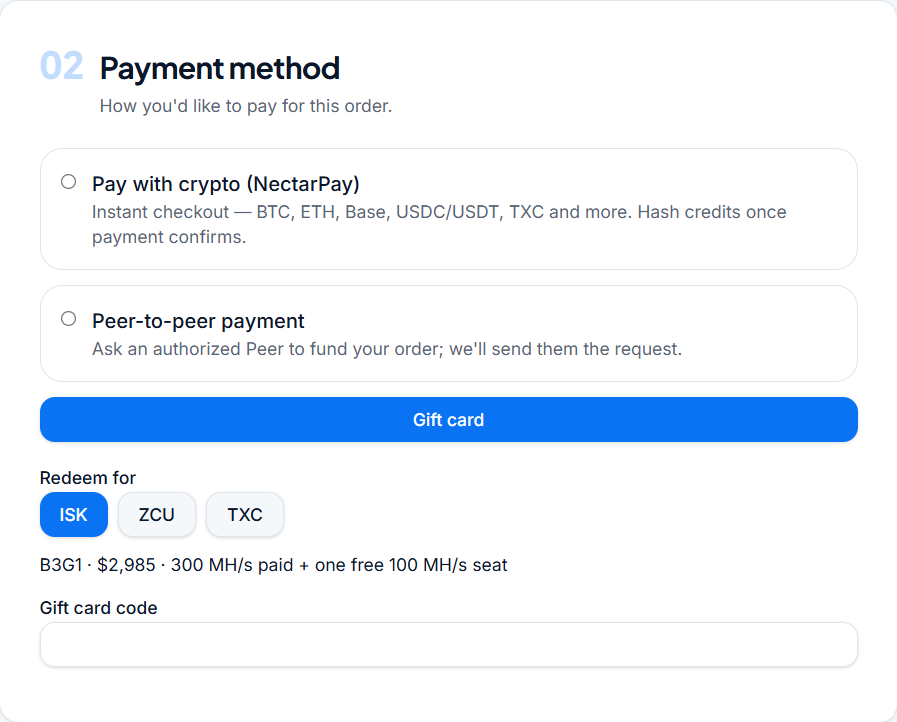
Step 2: Select Coin
Choose the specific coin you wish to purchase using your gift card.
Step 3: Enter Gift Card Code
Type or paste your gift card code into the designated input field. Make sure to double-check for any typos.
Step 4: Enter Sponsor Name
Input the name of your Sponsor into the required Sponsor Name field.
Step 5: Submit Order
Review your details and click Submit Order to complete your transaction.
Verification Checklist
Before clicking submit, ensure that:
The gift card code has been entered without extra spaces or typographical errors.
The correct coin type and quantity have been selected.
The Sponsor Name field is accurately filled out as required.